ThinkNode M9 SD Card Malware: What We Actually Know
Elecrow shipped ThinkNode M9 units with worm-infected microSD cards. What the advisory says, what the community found, and the indicators nobody has.
Elecrow shipped some ThinkNode M9 units with a Windows worm on the microSD card. They’ve put up a security advisory, they’re offering replacements and refunds, and the radio itself is fine.
The advisory doesn’t include a single hash. No batch range. No serial numbers. No family name. That gap is most of what this post is about.
Full disclosure on the lens, same as last time. I lead security at my day job and do vulnerability research on the side. Supply chain contamination in hobby hardware is exactly the kind of thing I read twice.
We don’t own an M9. We haven’t handled an infected card. Everything here comes from Elecrow’s advisory, the community tooling that showed up in response, and MITRE ATT&CK. Where something is a guess, I say so.
What Elecrow Says Happened
Their root cause is more specific than most disclosures manage.
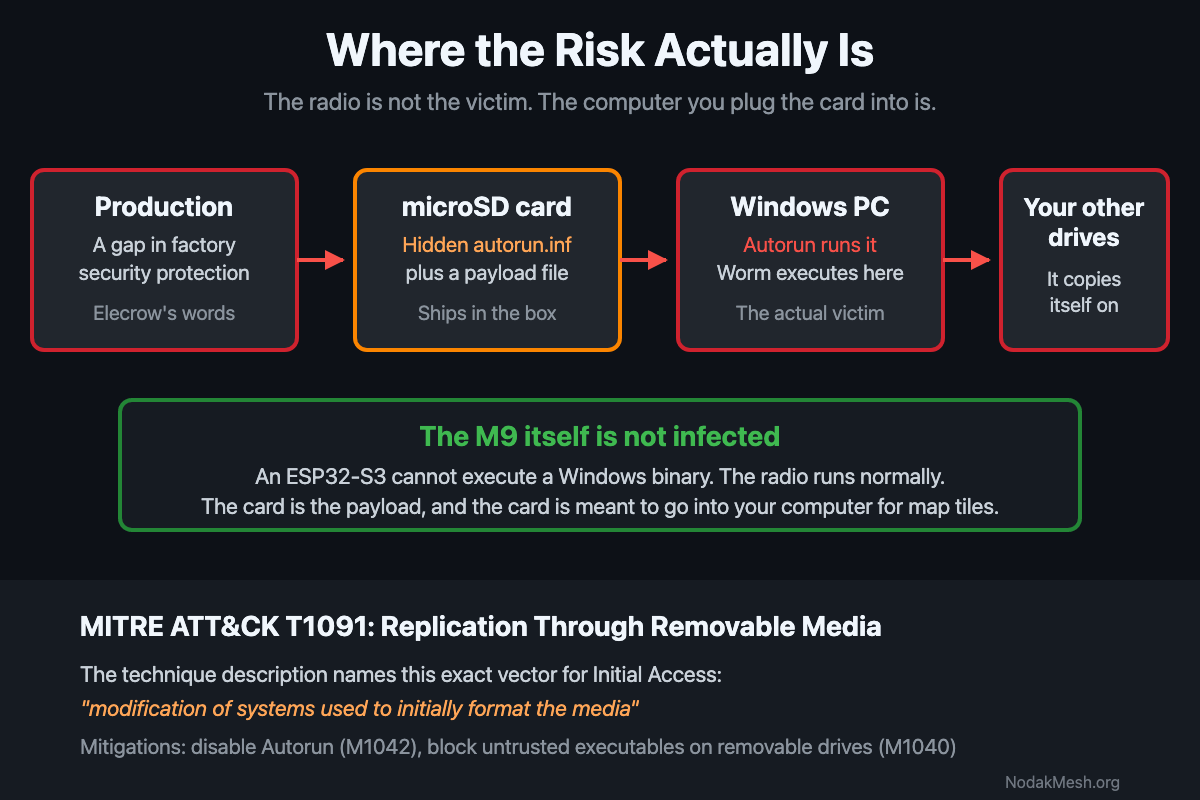
The contamination happened “during the factory flashing of map data onto the TF cards.” A gap in production-environment security protection let a worm onto some of them. So this wasn’t a random machine on the floor. It was the step that writes map tiles.
Windows only. It spreads through storage devices, TF cards and USB drives, by copying itself onto them. It can’t spread over a network, but once a PC is infected, every card or USB drive you plug into it gets infected too. Elecrow shows this with a test card holding a single file, test file.txt: it looks normal after a trip through an infected PC, and only showing hidden files reveals what the worm added. The malicious autorun.inf is hidden, and the payload is dressed up as a shortcut.
Elecrow also spells out what it does if it runs on an unprotected box. Registry edit to launch at startup. Disable or interfere with antivirus. Steal credentials. Copy itself onto your other drives. That’s their description, not a lab’s, and they published it instead of hiding behind “an issue was identified.”
Plenty in the advisory cuts the other way, and leaving it out would be dishonest:
- The virus sits dormant on the card. It never runs on the M9.
- Plugging the M9 into a computer over USB-C is safe. The card is the problem, not the radio.
- With working antivirus, it’s “usually blocked and removed immediately.” Elecrow says if you don’t double-click the disguised file, you don’t get infected.
Two precautions in their list are easy to skim past. Don’t pull the M9 apart yourself to get the card out. And don’t use the ESP’s Wi-Fi to pull files off the card over FTP, which moves the payload onto your machine without the card ever leaving the device.
Three ways out: send it back for a replacement, shipping from September 23. Keep it and clean the card yourself with their guides, which are split by firmware, Meshtastic and MeshCore, with a flash tool and videos. Or return it for a refund, which they say they’ll process within 24 hours of getting the device back. They also tell you how to wipe your personal data before shipping.
Credit where it’s due. They found it in their own supply chain, said so, named the production step, described the payload honestly, and offered money back. A lot of vendors would’ve quietly swapped stock and said nothing.
How This Kind of Thing Works
None of this is new, which is why it’s worth saying plainly.
An autorun.inf is a text file at the root of a card that tells Windows what to do when you open the volume. It was brutal in the 2000s. It’s much less so now. Windows 7 and later killed AutoRun for non-optical removable media, so on a patched machine that file doesn’t fire the second you insert the card. Its presence here is half leftover, half a bet on whatever unpatched box it eventually lands on.
So the shortcut is what actually gets you. The real executable is hidden. What you see looks like a folder. You click the folder, you run the hidden thing. Some families go further and hide every real file on the card, swapping in shortcuts with the same names, so the card looks completely normal until you go looking.
That path has nothing to do with AutoRun. It just needs you to double-click what looks like your own map folder.
For an M9 owner the practical part is simple. The worm can’t run on the radio. An ESP32-S3 has no way to execute a Windows binary. The card is dead weight in the device. It wakes up in your PC.
What the Community Found
On September 18 the wadamesh project shipped a release with an SD card scanner in it, built in response to this. Its release notes are the most specific technical writeup out there right now.
According to those notes, the infected cards carry a hidden autorun.inf at the root that fires a program called xlfqf.pif on open, explore, and autoplay, padded with junk lines to trip up simple scanners. The release says this matches “the pattern of the long-known Sality worm, which disables antivirus software, steals credentials and infects other programs on the PC.”
The wording there is careful, and it’ll get repeated less carefully. It says the pattern matches. It doesn’t say a lab identified the sample. Neither the release nor Elecrow claims a confirmed family.
A couple of notes from the security side.
The .pif fits. A PIF is an old Windows shortcut-to-DOS-program file. Windows will happily run one while most people read it as a harmless shortcut, and removable-media worms have leaned on that for twenty years. The junk padding is old too, aimed at signature matching rather than anything watching behavior.
Sality is plausible. It’s also unproven. Sality is a real polymorphic file infector, it does kill security software, it does drop copies and an AUTORUN.INF onto removable drives, and some variants steal cached passwords. So the description isn’t wrong about Sality. It also fits a dozen other autorun worms.
What nudges it up slightly: Elecrow landed on the same behavior on their own, without naming anything. Registry persistence, antivirus interference, credential theft, spreading to other drives. Two write-ups agreeing on what it does counts for something. Neither one tells you what it is.
Search xlfqf.pif and you get nothing in any public malware encyclopedia. Either the filename is randomized per sample, or nobody has bothered to analyze this one.
The Part That Bothers Me: No Indicators
Nobody has published any of this:
No MD5, SHA1, or SHA256 for the payload. None for the autorun.inf. No VirusTotal submission we could find. No affected batch, production window, or serial range. No detection name from any vendor. No sample anyone else can look at.
That’s a real problem, and it’s worth being specific about why instead of just grumbling.
Without a hash, nobody downstream can do anything. You can’t confirm the file you’re staring at is the bad one. A guy who keeps a few dozen club members’ nodes running can’t write a detection or sweep his fleet. The people writing scanners right now are working off a filename and a paragraph of behavior, so their tools have to guess. And nobody outside Elecrow can confirm or kill the Sality claim that’s already going around.
Without a batch range, every M9 owner has to assume their card is dirty. That’s worse for Elecrow than publishing the range would’ve been. It turns a scoped recall into a blanket one.
None of this needs a security program. sha256sum is one command. Uploading a file to VirusTotal takes a browser and a minute. The bar is on the floor, and clearing it would let a lot of people help.
Why the Targeting Is Unusually Tight
Most infected-media stories depend on somebody happening to plug the thing into a computer. This one’s tighter than that.
The cards got infected during the step that writes map data. Map data is also the reason you’d ever put the card in a computer. You pull it out to load or update tiles. The contamination and the user workflow are the same activity at opposite ends of the supply chain.
The crowd matters too. Mesh people tend to also run a home lab, hold credentials for a club repeater network, and shuttle the same USB sticks between machines. Elecrow’s own description includes credential theft. On that machine, that’s not a nuisance.
That said, nobody needs to panic. Antivirus catches this. Not double-clicking is enough to avoid it. The risk lands on whoever’s running an unprotected Windows box, and in this hobby that’s a smaller crowd than it used to be. Not nobody, though.
Where This Sits in ATT&CK
This is T1091, Replication Through Removable Media, which covers Initial Access and Lateral Movement on Windows.
The technique description already anticipates it. For Initial Access, ATT&CK lists “manual manipulation of the media, modification of systems used to initially format the media, or modification to the media’s firmware itself.” An infected production machine that formats and writes SD cards is the middle one, word for word.
The company T1091 keeps is a little sobering. Stuxnet. Conficker. Agent.btz. Raspberry Robin. A long row of state-linked toolkits. Nobody targeted Elecrow here, and I’m not implying otherwise. It’s just a reminder that removable media still works because it walks straight past everything you spent money on at the network edge.
The mitigations are boring and they work. Turn off Autorun (M1042). Use Attack Surface Reduction rules to block untrusted executables running off removable drives (M1040). Keep removable media out where you don’t need it (M1034).
What To Do If You Have One
Don’t plug the card into a Windows machine to “just check it.” That’s the exact move the thing is waiting for. If you already did, run a full scan with something current and change any password your browser had saved.
Take the replacement or the refund if you’d rather be done with it. Elecrow’s offering both, and a new card costs you shipping time and nothing else. If you’re shopping in the meantime, our MeshCore devices list is what we actually run.
If you want to poke at it, do it where it can’t win. Linux or macOS won’t execute a Windows PIF, so mounting the card there is dramatically safer. Turn on hidden files. Check the root for autorun.inf and anything ending in .pif, .lnk, .exe, .scr, or .vbs. Then check whether your visible files are really shortcuts wearing folder icons.
If you find it, hash it and upload it. Posting a SHA256 would be the most useful thing anybody in this hobby does this week, and it closes the hole Elecrow left.
Reformatting fixes it. This is a file-based worm, not a boot sector or firmware infection, so a format clears it and even a quick format takes the files with it. Do a full one if it makes you feel better. Reload maps from a source you trust. Elecrow’s guides cover the same ground.
What I’d Want From Elecrow
A short follow-up would finish this properly. The SHA256 of the payload and the autorun.inf. The affected production window or batch numbers. The detection name once some AV vendor assigns one. And if they still have a sample, hand it to VirusTotal so every security product on the market learns to spot it.
They handled the disclosure better than most companies do. Indicators would take it from decent to genuinely good.
New to this corner of the hobby? The MeshCore getting started guide is the gentler way in. And if you’ve got an M9, tell us what’s on your card, especially if you get as far as a hash. We’ll update this post if indicators turn up, and we’ll say so plainly if the Sality call turns out to be wrong.
Comments
Related Posts

Reading the MeshCore Disclosure From the Field
A buffer overflow in MeshCore was fixed in v1.14.0 without an advisory. The exploit primitive, the impact tiers, and why disclosure still matters.
3D-Fuel Partnership: Mesh Node Filament Made in Fargo
NodakMesh partners with 3D-Fuel, which makes its filament in Fargo, USA. We toured the plant. Code NODAKMESH takes 10% off, plus a spool for every build.

MeshCore Split: Andy Kirby's Response
Andy Kirby posted a video response to the MeshCore split. Here's his stated position on the trademark, his role, and the AI question.