MeshCore Not Showing Other Nodes? How Discovery Works
Empty MeshCore contact list? Unlike Meshtastic, MeshCore stays quiet until a node sends an advert. Here's how to advertise and find other nodes.
On this page
- Meshtastic vs MeshCore: A Quick Overview
- How Meshtastic Devices Find Each Other
- Tips for Meshtastic discovery
- How MeshCore’s Device Discovery Differs
- Why MeshCore does this
- Why Your MeshCore Device Isn’t Finding Others (Yet)
- How to Discover Contacts on MeshCore (Step-by-Step)
- 1. Set up on the same frequency and preset
- 2. Use the public channel
- 3. Advertise your device
- 4. Have the other party advertise (if possible)
- 5. Ping known repeaters (advanced)
- 6. Leave your radio on and listen
- 7. Coordinate with the community
- MeshCore vs Meshtastic: Discovery Tradeoffs and Tips
- The Key Takeaway
When people move from Meshtastic to MeshCore, or start fresh with MeshCore, the first question is almost always: “Why can’t I find any other devices on my mesh network?”
This post walks through how device discovery works on each, what’s different, and how to go from an empty contact list to a working mesh on MeshCore.
We run both protocols on our network. What’s below is pulled from our own onboarding experience plus community reports, including Michael Lynch’s excellent first impressions writeup, which several of the screenshots come from.
Meshtastic vs MeshCore: A Quick Overview
Meshtastic is an open-source, off-grid mesh network for LoRa radios, known for its easy setup and community-driven approach. Any Meshtastic device on the same channel (frequency and encryption key) can relay messages to extend range, and nodes periodically broadcast telemetry (location, battery, etc.) to announce themselves.
MeshCore is a newer LoRa mesh system focused on efficiency and scalability. It uses fewer background broadcasts to preserve bandwidth. MeshCore relies on dedicated repeaters for relaying messages. Most user devices (called companions) don’t automatically forward other people’s traffic.
Key difference in philosophy. Meshtastic assumes “everybody is a repeater” by default, which helps spontaneous ad-hoc networks but leads to a lot of chatter in dense areas. MeshCore assumes a structured network where only dedicated repeaters rebroadcast messages, which keeps the network quiet and fast under load. This difference greatly impacts how each system finds and displays other devices.
Important note. Meshtastic and MeshCore are not compatible with each other. They use different mesh protocols and can’t communicate directly. A Meshtastic device won’t see MeshCore nodes, and vice versa. If you want to bridge the two networks, you’d need an external tool like the Akita Meshtastic-to-MeshCore bridge. Most users pick one system or run separate devices for each.
For a broader breakdown of these differences, see our MeshCore vs Meshtastic comparison.
How Meshtastic Devices Find Each Other
Meshtastic devices automatically discover each other through periodic broadcasts. When you power on a Meshtastic node, it announces its presence to the mesh by sending a “node info” packet. Other nodes that hear this will add that device to their Nodes list in the app. Your node, in turn, listens for announcements from others. These exchanges aren’t instantaneous. They depend on periodic events and radio traffic.
Periodic telemetry. By default, Meshtastic radios broadcast status data (battery, position, etc.) at set intervals. Location every ~15 minutes. Node info every few hours. As meshes grow, the firmware slows these intervals to reduce congestion.
Managed flood routing. By default, every node can forward messages for others. Modern Meshtastic versions use a managed flood approach with next-hop routing for direct messages. Non-dedicated nodes still rebroadcast certain packets, helping spread device announcements further.
Channels and keys. Meshtastic uses channels (with an encryption key or URL). Only devices on the same channel and key will hear each other’s announcements. Many public Meshtastic users stick to the default “LongFast” channel, which serves as an open network in some areas. If you join that default channel and others in your area are on it, you might start seeing their nodes populate your app’s list after a while.
Discovery isn’t instant. One Meshtastic user likened it to bat echolocation. A bat must emit a sound and wait for an echo because the environment is quiet. Similarly, most Meshtastic nodes don’t constantly chatter. They broadcast infrequently to save power. As a community member put it: “A lot of newcomers think you can just turn on your node and see others instantly, but that’s not how it works. The best way to learn about other nodes is to make some noise (send a message or position) and see what comes back.” If you power up your Meshtastic radio and no one else is actively transmitting, you might see an empty node list for some time.
If another Meshtastic node is in range and broadcasting, your device will eventually pick that up. The Nodes tab will list any discovered nodes once their packets are heard. The Meshtastic Android app is designed to display all nodes on your mesh channel automatically. You don’t need to manually search. The main factors are same channel settings, being in radio range, and waiting long enough for the periodic broadcasts to occur.
Tips for Meshtastic discovery
Make sure your region and radio preset match what others use in your area (LongFast in the US, for example). If no one shows up, try sending a message on the public channel or bump your node’s activity to trigger a GPS broadcast. Sending a hello message or two can prompt nearby users or bots to respond. And leave the radio on and listening for an extended period. An hour or more is often needed to catch a brief beacon from another node, especially solar-powered sensors that beacon only once a day.
How MeshCore’s Device Discovery Differs
MeshCore approaches discovery very differently. Its philosophy of minimal network chatter means devices don’t automatically broadcast their presence as often as Meshtastic nodes do. A regular end-user device (Companion firmware) won’t periodically flood the network with telemetry or node info. Only repeaters (infrastructure nodes) send out occasional adverts, and even those are infrequent by default.
A MeshCore repeater’s default setting is to advertise its presence only once every few hours (often around 4 hours). This interval can be configured, but the out-of-the-box behavior is to keep the airwaves mostly quiet to preserve capacity for actual messaging.
For a user with a MeshCore handheld or paired device, the lack of automatic chatter means you won’t see a list of nearby nodes pop up quickly, unless some specific action occurs. The MeshCore mobile app (or web app) has a Contacts or Discover screen where other nodes would appear. Initially this will be empty. The MeshCore app will explicitly show “No contacts” until discovery happens.
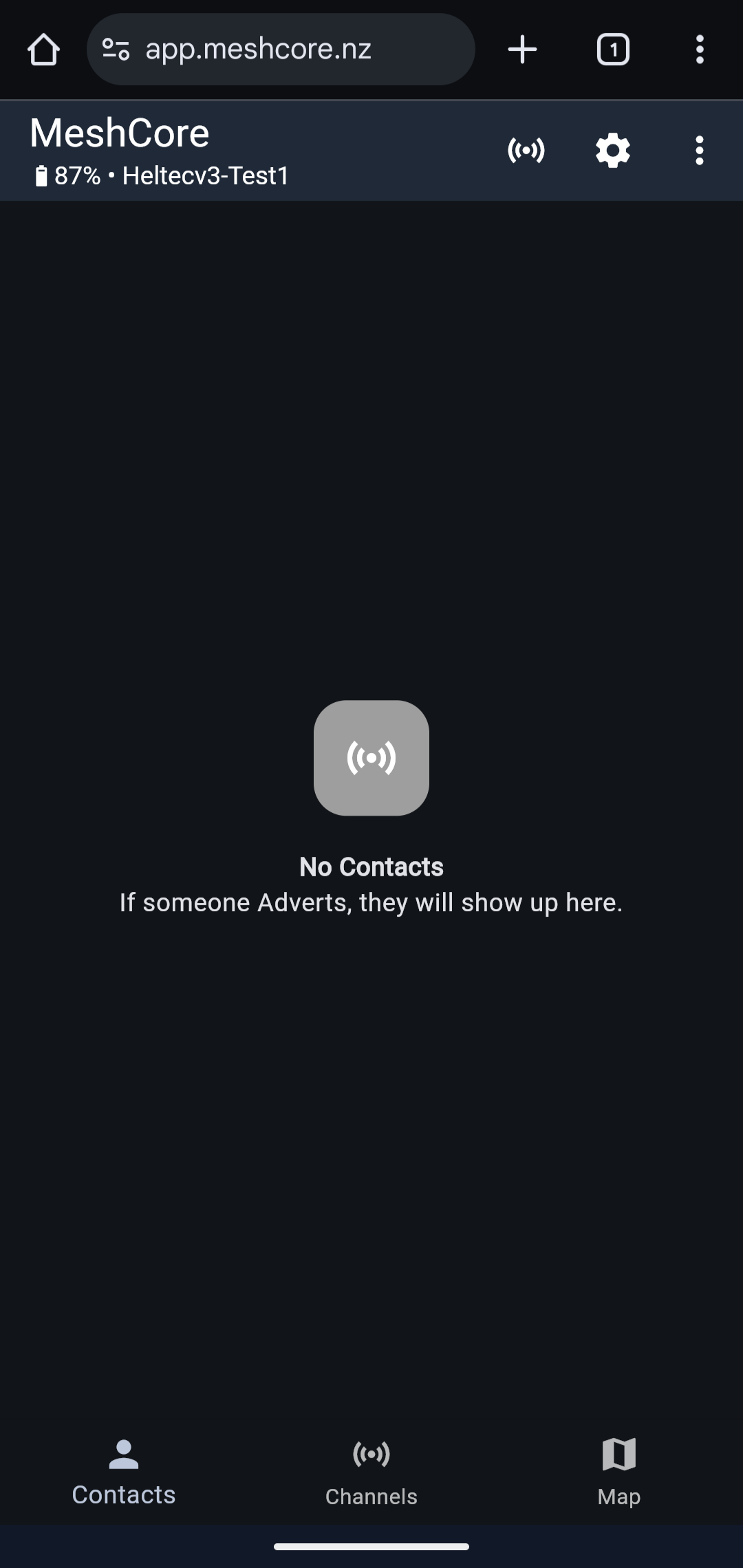 MeshCore app showing an empty contact list. Screenshot via Michael Lynch.
This design reflects MeshCore’s opt-in discovery. Devices remain silent until they or someone else actively shares their identity.
Here are the key differences in MeshCore’s discovery.
Advertise vs automatic. MeshCore uses an Advert mechanism to share device identity. An advert is a broadcast of your node’s info (public key or address) to others on the network. Meshtastic’s equivalent is the periodic node info packet. MeshCore doesn’t send these adverts on a short timer by default. You usually need to manually trigger an advert from the app to announce your device, or wait many hours for a repeater’s periodic advert.
No flooding from clients, by default. Regular MeshCore devices (companions) don’t forward each other’s packets or adverts by default. Only dedicated MeshCore repeaters rebroadcast across the mesh. If your companion device hears another companion’s advert, it won’t propagate it further. Discovery is mostly direct within radio range, unless a repeater extends the range. By contrast, Meshtastic client nodes rebroadcast certain discovery packets, helping news of a node travel farther by flood.
Public channel vs direct peering. MeshCore has the concept of a public “All” channel for general broadcasts (similar to Meshtastic’s default channel, but unencrypted). Out of the box, your MeshCore device can send and receive public messages to any others using the same frequency preset. Seeing someone on the contacts list for direct messaging usually requires exchanging contact info via adverts. Essentially a handshake.
When you first set up two MeshCore devices, you might notice they don’t see each other in the contacts list even if they’re on the same frequency. In Michael Lynch’s first test of two MeshCore radios, after fixing the region preset, the devices could communicate on the public channel but still didn’t appear in each other’s contact list. Neither had shared their identity keys. Using the “Advertise (Zero Hop)” function on one device made it visible to the other, and vice versa. In his words, it felt like a “half-completed handshake” until both sides advertised.
Why MeshCore does this
By not constantly announcing every device, MeshCore dramatically cuts down on background traffic. This makes a big difference in larger networks. It avoids the chatter that can clog the air in Meshtastic when dozens of nodes frequently broadcast status. The tradeoff is a slightly more manual discovery process. The benefit is efficiency and speed. MeshCore networks often feel snappier and handle dense usage better because nodes aren’t busy relaying non-stop status updates. One community observation is that MeshCore “feels considerably faster” in message delivery with default settings, where Meshtastic can be tuned but is slower by default. MeshCore values opt-in visibility. You only show up on others’ devices when needed, versus Meshtastic’s always-on visibility model.
Why Your MeshCore Device Isn’t Finding Others (Yet)
New MeshCore users, especially those coming from Meshtastic, often feel like “nothing is happening, I see no devices.” Don’t panic. This is normal. Here’s why a MeshCore device often sits with an empty contact list initially.
Rare adverts. Other MeshCore users in range might be out there. If neither you nor they have sent an advert or message, both sides remain invisible. Unlike Meshtastic, turning on a MeshCore radio doesn’t immediately broadcast a presence beacon that guarantees others will notice you. MeshCore might do a very brief initial advert, but it’s easy to miss if timing doesn’t line up.
Patience required. MeshCore repeaters advertise only every few hours by default. If the only nearby node is a repeater on that schedule, you could literally wait hours before it announces itself to your device. A neighbor’s companion device might not send anything unless they actively use it. Idle MeshCore nodes stay quiet for long stretches.
No automatic handshake. In Meshtastic, if you send a message on the default channel, any node that hears it will at least log your node info and you’ll appear in their node list eventually. In MeshCore, sending a message on the public channel doesn’t automatically exchange identity keys. You might see the message go through if someone receives it, but they still won’t appear as a named contact for direct chat without the advert exchange. This leads to confusion where you know someone else is out there (they replied on public), yet they’re not in your contacts list.
Different app behavior. The MeshCore app’s Discover or Contacts tab isn’t continuously scanning or “finding” devices like a Bluetooth scan would. It’s waiting to hear from the radio’s firmware about known contacts. If that firmware hasn’t heard any adverts or introductions, the app stays empty. The app tells you that if someone advertises, they’ll show up. It’s a hint that action is required either on your part or the other device’s part to trigger discovery.
Compare this with Meshtastic. On the Meshtastic app, you might see a list of all nodes that have ever been heard on your channel, even if it took some time to populate. On MeshCore, you may see nothing until a successful exchange happens. The quietness is actually a good sign. MeshCore is preserving battery and airtime.
How to Discover Contacts on MeshCore (Step-by-Step)
Here’s how to go from an empty MeshCore contact list to actually finding and listing nearby devices.
1. Set up on the same frequency and preset
As with Meshtastic, both devices need to share radio settings. Make sure your MeshCore device is configured for your region’s LoRa frequencies and preset. Choose the appropriate country preset (like “USA/Canada”) in the MeshCore app settings. If you and others aren’t on the same frequency plan, you won’t hear each other at all.
2. Use the public channel
Start by trying a message on the default public channel (often called “All” or similar in the app). This is a broad broadcast that any MeshCore node in range can receive. It’s like calling out “Anyone out there?” on the network. This alone won’t put them in your contacts, but it serves two purposes. It checks that your device is working and in range (if someone responds publicly, you have confirmation), and it may prompt attentive users to initiate a contact exchange.
3. Advertise your device
Open the MeshCore app’s menu for Advertise (often accessible via a ”+” or options menu on the contacts screen). You’ll typically see options like Advert: Zero Hop and Advert: Flood.
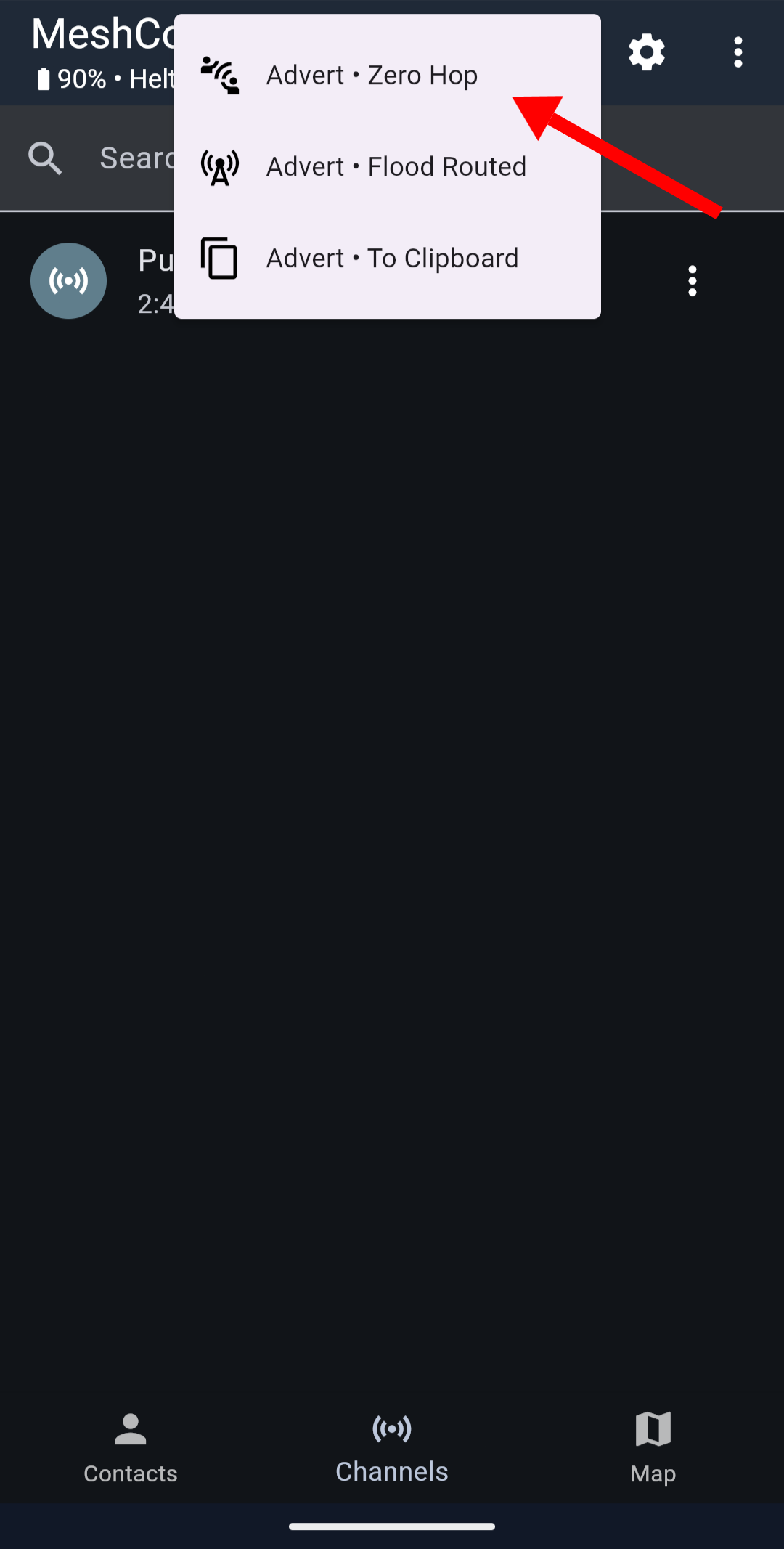 The MeshCore Advertise menu showing Zero Hop, Flood Routed, and To Clipboard options. Screenshot via Michael Lynch.
Start with Zero Hop. This sends a one-time beacon of your device’s identity to immediate neighbors only. Repeaters won’t forward it. Zero Hop is polite on bandwidth and is great if you suspect others are directly in range. After doing this, watch your contact list. Any device that hears your advert should appear (possibly after a short delay for processing).
Consider a flood advert. If you’re in an area with repeaters or you want to reach further, a flood advert propagates through the mesh via repeaters, potentially reaching nodes multiple hops away. Use this sparingly, as it’s more intrusive network-wide. If no one local shows up from zero-hop and you know there are repeaters around, a flood advert can announce you to the wider mesh.
The app might also offer “Advert to Clipboard,” which copies your contact info (public key or address) to share with someone out-of-band. Not needed for normal discovery.
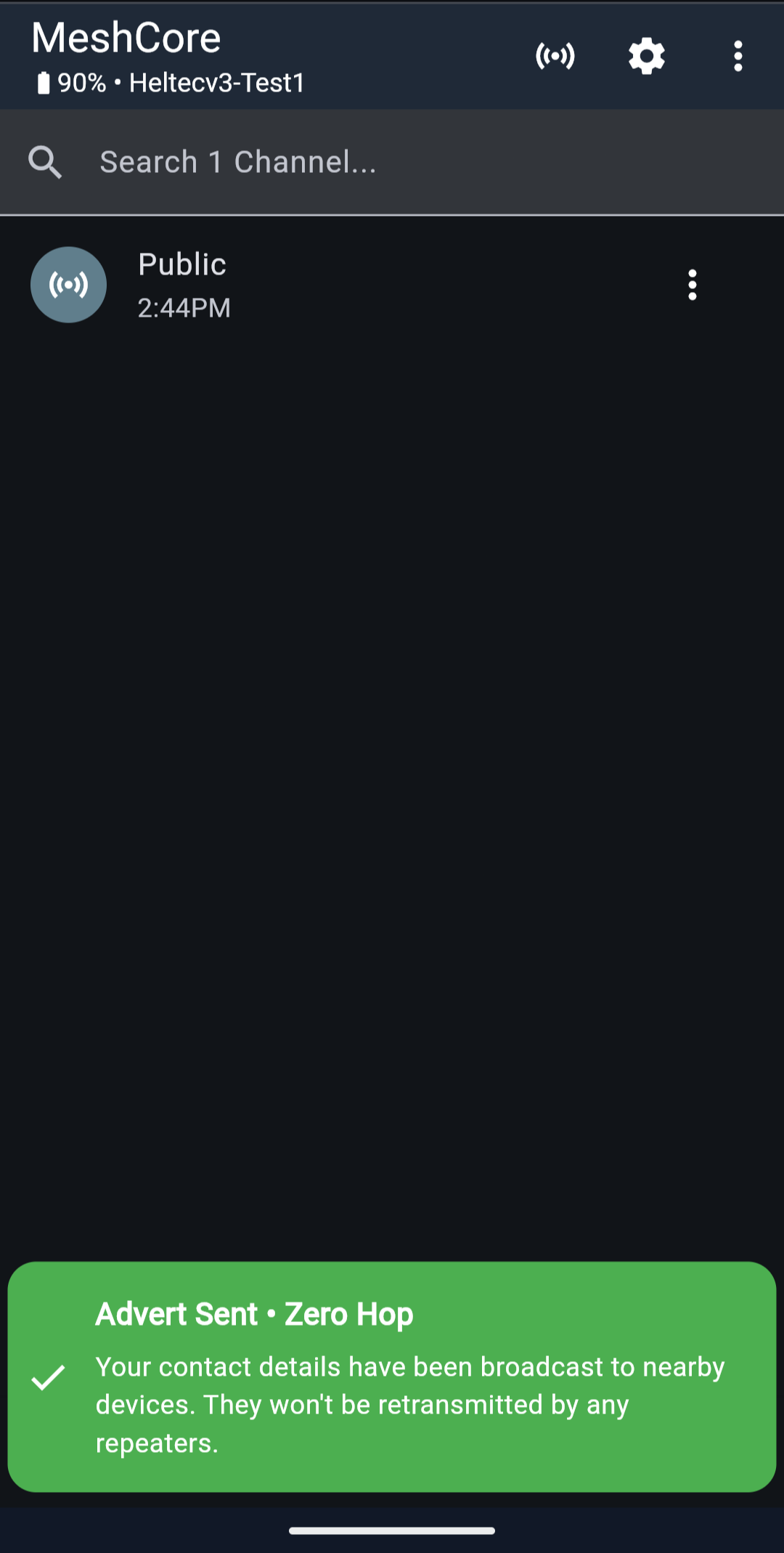 Confirmation that your advertisement was sent successfully. Screenshot via Michael Lynch.
4. Have the other party advertise (if possible)
If you’re coordinating with a friend or you got a public reply from someone, ask them to also send an Advert. Discovery is often mutual. Your device might list others once they advertise, and vice versa. In many cases, both sides need each other’s info exchanged for full two-way direct messaging. After Device A advertises, Device B sees A in contacts. But A may not see B until B also advertises back. Once both have exchanged adverts, you’ll each show up in the other’s contact list, allowing direct encrypted messaging.
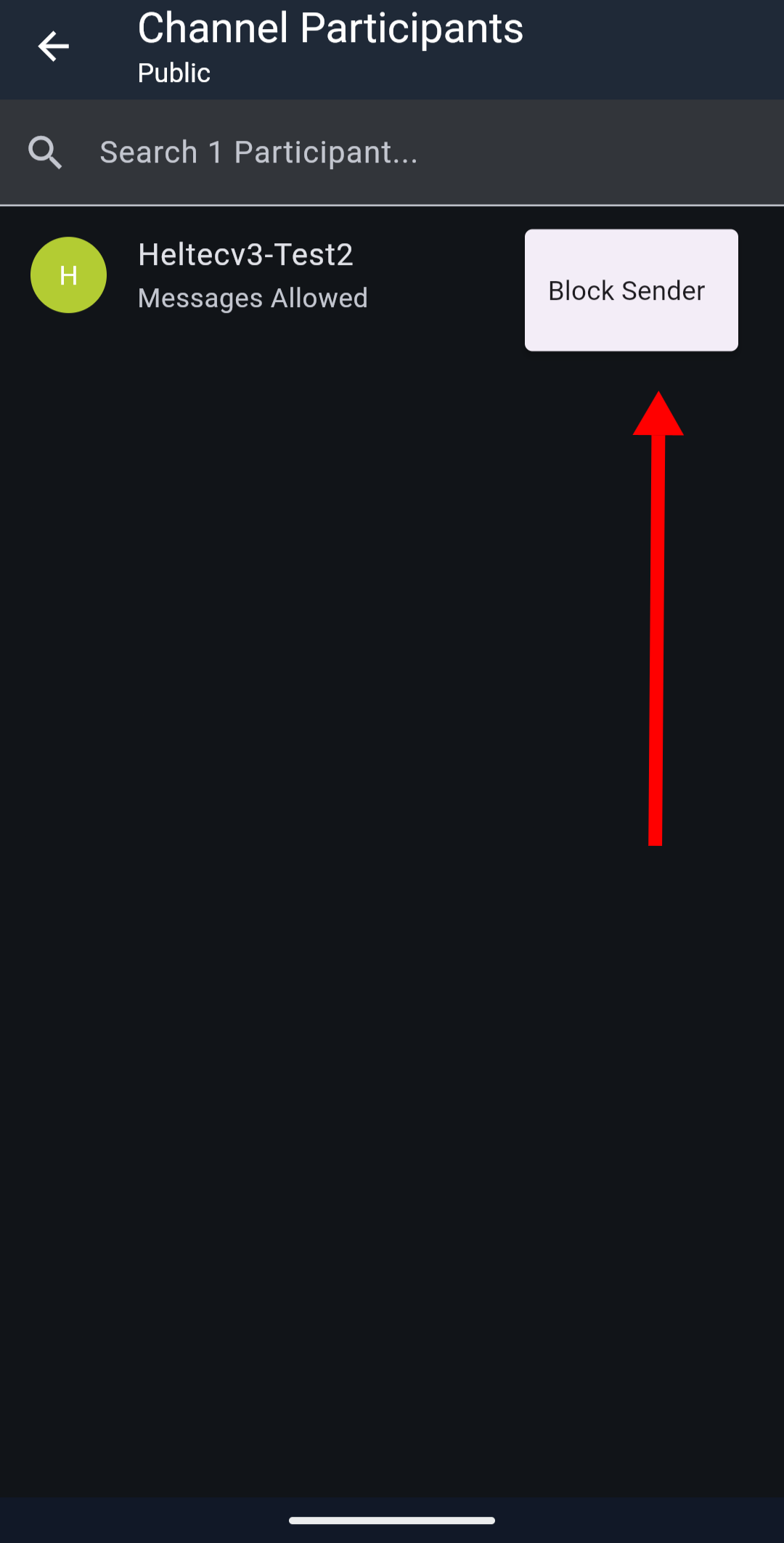 Once contacts are discovered, they appear in the Participants view. Screenshot via Michael Lynch.
5. Ping known repeaters (advanced)
If you know a MeshCore repeater exists (from a community map or list), you can use the app’s Ping feature. You’d first need that repeater to appear in your contacts, which might only happen after it advertises or after you’ve done a flood advert. Some users mention selecting a repeater and using a “Ping” command to prompt a response. This is a troubleshooting step. It’s useful if a repeater is in your list but you’re not sure it’s active. It won’t help if the repeater isn’t discovered at all yet.
6. Leave your radio on and listen
As with Meshtastic, patience helps. If you’ve advertised and no one immediately showed up, keep your device powered on and in a good location (high up, near a window). You might catch a scheduled advert from a repeater or another user eventually. MeshCore devices log contacts over time as they hear them. Keep your phone connected to the radio (via Bluetooth or USB) during this listening period so the app can update with any new contacts heard.
7. Coordinate with the community
If you’re actively trying to find other MeshCore users in your area, reach out via online communities (Discord, forums, local groups). MeshCore users in a region often share which frequency and settings they use. They may also schedule nets or suggest times to try. Check if there’s a regional mesh group or the official MeshCore map (the web map might not show live users yet by default). Some MeshCore enthusiasts share contact info or run room servers, which are like bulletin board nodes you can intentionally connect to if within range.
Following these steps, you should gradually see contacts appearing in your MeshCore app. After you and your friend both send Zero Hop adverts, you’ll suddenly see each other listed with your chosen device names, and you can tap on a contact to start a direct encrypted chat (no more broadcasting to everyone).
MeshCore vs Meshtastic: Discovery Tradeoffs and Tips
A quick comparison to make the transition smoother.
Frequency of discovery messages. Meshtastic broadcasts node info frequently (minutes to hours) by default, so networks feel populated. MeshCore broadcasts rarely (hours or only on demand), so networks feel empty until stimulated. Tip: don’t be alarmed by silence on MeshCore. Use adverts or send a message to stir activity.
Initial setup. Meshtastic devices on the same default channel might automatically find each other eventually. MeshCore devices require matching presets and an advert exchange. Tip: double-check your MeshCore preset when starting out. Mismatched settings are a common reason for “no devices found” on either system.
App user interface. The Meshtastic app automatically lists nodes under “Nodes” as they’re heard. The MeshCore app’s Discover/Contacts list remains empty until an advert or known contact is present. Tip: the Advertise button is your friend. Use the map or telemetry features once contacts are added to see distance or signal for known nodes.
Network scale. Meshtastic’s approach works great for small, mobile groups. Everyone helps relay and you get a dynamic mesh. In a city-wide mesh with dozens of nodes, the constant discovery chatter can actually slow things down or overload the channel. MeshCore’s quieter approach scales better in dense networks. Tip: if you’re building a larger mesh (community or emergency network), lean into MeshCore’s strategy. Set up a few well-placed repeaters and let regular users stay in companion mode. This infrastructure provides the backbone so not every user needs to advertise frequently.
Power saving. Both systems try to save battery by limiting transmissions, but MeshCore pushes this further. A Meshtastic node might transmit every 15 minutes regardless. A MeshCore node can be effectively silent when not in active use. Tip: for battery-powered nodes (sensor or solar units), MeshCore’s default is advantageous. A mostly-silent node means others must initiate contact to find it. If you deploy a MeshCore sensor, you may want it to advert on a schedule (configurable via set advert.interval) if you expect others to discover it regularly.
The Key Takeaway
Switching from Meshtastic to MeshCore involves a mindset shift. Meshtastic gives you instant gratification in seeing a list of nodes (provided someone is broadcasting). MeshCore emphasizes intentional discovery to keep the network efficient. Neither approach is universally “better.” They’re optimized for different scenarios.
For a new MeshCore user, the key takeaway is: don’t assume “no contacts” means no one is there. It might just mean you need to introduce yourself (advertise) or listen longer. Once you perform that initial handshake, MeshCore devices are capable of maintaining communication and will remember contacts. From that point on, your MeshCore will know those peers and can communicate directly and quickly.
If you find yourself wondering “Where is everyone?” after booting up MeshCore:
- Check your settings
- Send out a beacon (advert)
- Be patient while listening
If a repeater is the problem, see MeshCore repeater not showing up or not repeating. On Meshtastic, see Meshtastic not seeing other nodes.
Both Meshtastic and MeshCore communities are active on Discord and community forums. If you hit a wall, ask. Someone nearby has almost certainly solved the same discovery problem and can tell you what to try next.
Comments
Related Posts

How MeshCore Works: Companions, Repeaters and Room Servers
A plain-English guide to MeshCore: what companions, repeaters and room servers do, how messages find a path, which frequency to use, and common fixes.
What Is a LoRa Mesh Network? The Beginner's Guide
LoRa mesh networks send text and GPS data miles over long-range radio without cell service or internet. Here's how they work and why they matter.
Meshtastic Device Roles Explained: All 12 Types
Every Meshtastic device role covered. What each does, when to use it, and how wrong role choices quietly kill a mesh. Field-tested guidance.