Meshtastic LNA Auto Mode Explained for Heltec V4 and T096
Meshtastic's new FEM LNA Auto mode checks your noise floor to decide if the Heltec V4.3 or T096 receive amp helps, and fixes RSSI reading 23 dB high.
Meshtastic just merged a third choice for the receive amplifier on the Heltec V4.3 and the Mesh Node T096. Alongside Enabled and Disabled, the FEM LNA setting now has Auto: the firmware measures the noise at your site and decides for itself whether the amplifier is helping. The same change fixes signal readings that have been coming out about 23 dB too strong on these boards. It merged on November 16, after the 2.8.2 alpha, so it isn’t in a release yet.
Everything here comes from the pull request, the firmware source and the setting’s definition in Meshtastic’s protobufs. We haven’t run a build with it yet.
What the LNA Does
The Heltec V4.3 doesn’t connect its SX1262 straight to the antenna. Between them sits a KCT8103L front-end module (FEM): a power amplifier for transmit and a low-noise amplifier (LNA) for receive. The LNA adds about 23 dB of gain to everything coming in from the antenna before the radio chip sees it.
That gain only helps when the radio chip’s own noise is what limits reception. At a quiet rural site, the faintest packets sit just above noise the receiver makes itself, and amplifying them ahead of that noise lets the radio pull out signals it would otherwise miss. In town, indoors next to a computer, or on a tower shared with other transmitters, the noise coming in through the antenna is already louder than the receiver’s own. The LNA raises that outside noise by the same 23 dB as the signal, so the signal-to-noise ratio barely moves. You pay the current and get almost nothing back.
It can also make things worse. A strong transmitter nearby can push the amplifier past what it handles cleanly (called compression), and weak signals get harder to hear, not easier.
A Setting That Kept Changing
Meshtastic added the fem_lna_mode setting in 2.7.20. In 2.7.21 it became Enabled by default on the V4.3, because owners who never touched it were getting poor receive. A later proposal to flip the default back to Disabled (#12255) was never merged. Auto replaces that back-and-forth. Instead of one default for every site, the firmware measures each one.
How Auto Decides
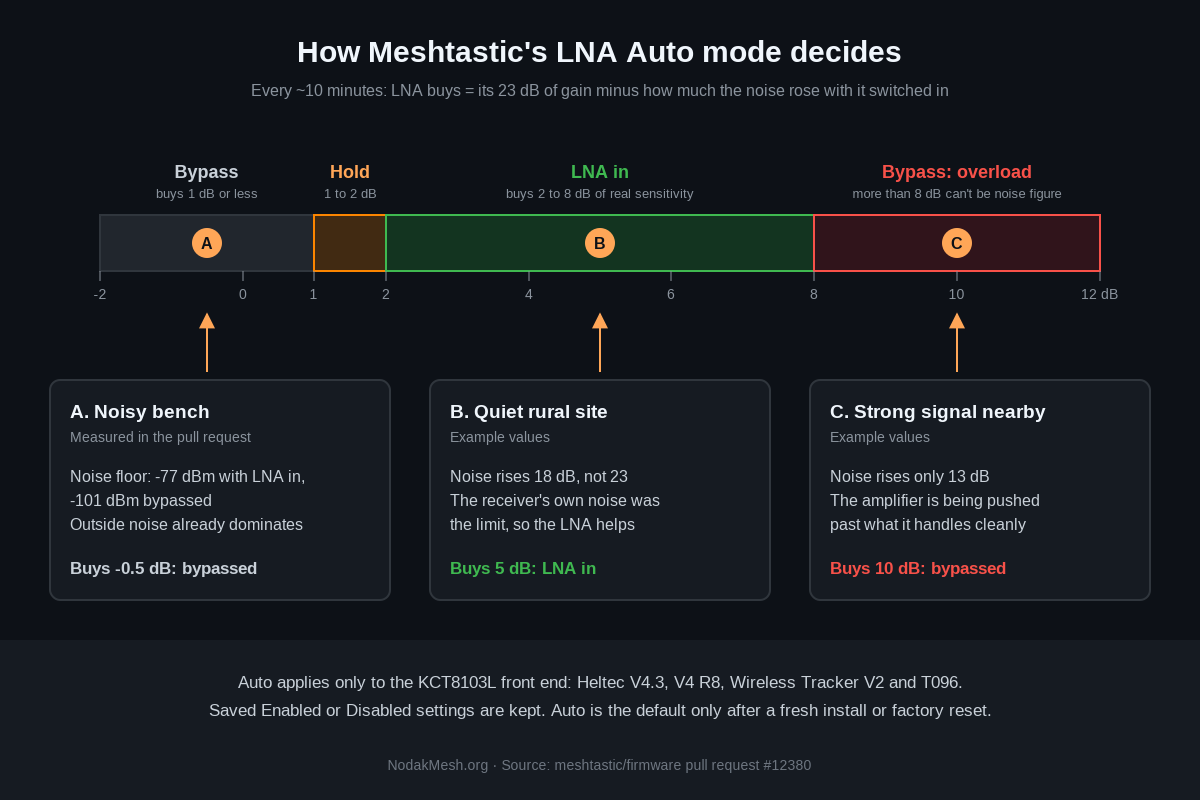
Once a minute, alongside its regular noise-floor reading, the firmware switches the LNA for about a millisecond and reads the noise on the other path. After 10 of those pairs (about ten minutes), it compares how much the noise rose with the LNA in against the LNA’s 23 dB of gain. The difference is what the LNA is actually buying you.
Noise rose by nearly the full 23 dB. The LNA is amplifying outside noise, not adding sensitivity. If it buys 1 dB or less, Auto bypasses it.
Noise rose clearly less than 23 dB. The LNA is lowering the receiver’s effective noise, which is real sensitivity. If it buys 2 dB or more, Auto switches it in.
Between 1 and 2 dB. No change. That band keeps a borderline site from flipping back and forth.
More than 8 dB. An LNA can’t improve reception that much through its low noise alone, so Auto reads it as a strong signal overloading the amplifier and bypasses.
It uses the median of the ten pairs, not the average, so a packet that arrives mid-measurement can’t swing the decision. The result is saved, and after a reboot the node starts where it left off instead of spending another ten minutes with the LNA in.
In the pull request’s own bench test, a V4.3 in a noisy spot read a noise floor of about -77 dBm with the LNA in and -101 dBm bypassed. Auto logged “LNA buys -0.5 dB, now bypassed”, which is the right call there. The other direction, switching the LNA in at a quiet site, has only been checked in unit tests so far, not on hardware.
Your Signal Numbers Will Drop by 23 dB
This part affects every V4.3 and T096 running with the LNA in, which has been the default since 2.7.21. The SX1262 measures signal strength (RSSI) at its own input, after the LNA, and until now nothing subtracted the LNA’s gain. With the LNA in, every reading came out about 23 dB too strong. Nodes a few meters away showed 0 to -2 dBm (the field can’t go above 0), and the noise floor read about -77 dBm instead of about -100.
Once this ships, the firmware subtracts the gain whenever the LNA is in. Your numbers will look worse overnight. Reception won’t be. If you log RSSI for range tests or compare nodes across your mesh, note the day you updated, or your before and after numbers won’t line up.
Which Boards Get It
Auto only works where the firmware can switch the LNA, which today means the KCT8103L: the Heltec V4.3, V4 R8, Wireless Tracker V2 and Mesh Node T096. The Heltec V4.2 uses a different front end, the GC1109, whose LNA can’t be switched, and it behaves exactly as before, readings included.
The firmware works out which one your V4 has at boot. The serial log says either “Detected KCT8103L LoRa FEM” or “Detected GC1109 LoRa FEM”. New to the board? Start with our Heltec V4 setup guide.
What to Do When It Ships
Existing nodes keep their setting. There’s no migration. A V4.3 that’s been on Enabled since 2.7.21 stays on Enabled after the update. Auto only becomes the default on a fresh install or a factory reset.
To try Auto, pick it from the on-device menu (LoRa, then FEM LNA), which gains an Auto entry. The pull request confirmed an older Python CLI reads the new value back as a plain 3 without errors, so your phone app may show the setting oddly until it learns about Auto. A factory reset also gets you Auto, but it puts every other setting back to its default too, and the full device reset also gives your node new keys. Back up first.
Quiet rooftop and rural repeaters. If Enabled is working at a quiet site, there’s no reason to change it until Auto’s quiet-site behavior has been tested on real hardware.
Nodes in town, indoors or on shared towers. Auto is worth trying here. These are the sites where the LNA is most likely buying nothing.
Solar and battery nodes. The LNA is an amplifier, and it draws current whenever it’s in. Meshtastic hasn’t published what it costs on the V4.3, but at a site where the LNA isn’t helping, bypassing it is current you get back for free.
Auto should arrive in the next Meshtastic alpha after 2.8.2, and our release tracker will show it when it does. Running a V4.3 or a T096? Once it ships, we’d like to hear which way Auto goes at your site.
Comments
Related Posts
Meshtastic 2.7.21 Alpha: HTTP Deprecation and LNA Default
Meshtastic 2.7.21 alpha deprecates the HTTP server on original ESP32, flips LNA on by default for Heltec V4.3, and adds a RAK 13302 gain table.
Meshtastic 2.8: What's New and Should You Update?
Meshtastic 2.8 changes US presets, signs broadcasts, gives nodes new IDs and makes position sharing opt-in. What changes, what breaks, and when to update.
Meshtastic Packet Signing Explained: What 2.8 Protects
Meshtastic 2.8 signs broadcasts with XEdDSA. What a signature proves, what it doesn't, the three receive policies, and why 2.8.0 was pulled.