Meshtastic Ham Mode: New 2 m, 1.25 m and 70 cm Regions
Meshtastic 2.8 adds licensed Ham Mode and amateur regions on 2 m, 1.25 m and 70 cm. What it changes, the default frequencies, and the hardware you need.
Meshtastic has always had a licensed mode for hams, but in the US it still put you in the same crowded 902 to 928 MHz band as everyone else. Meshtastic 2.8 changes that. It adds amateur regions on 2 meters, 1.25 meters and 70 centimeters, and a Ham Mode prompt right on the device screen. If you hold a license, you can now run a LoRa mesh on ham frequencies, with ham-band rules built into the firmware.
2.8.1 is still an alpha, and hardware for these bands is just arriving. Everything here comes from the 2.8.1 release notes, the pull requests that added each region, and the firmware source at the 2.8.1 tag.
The New Regions
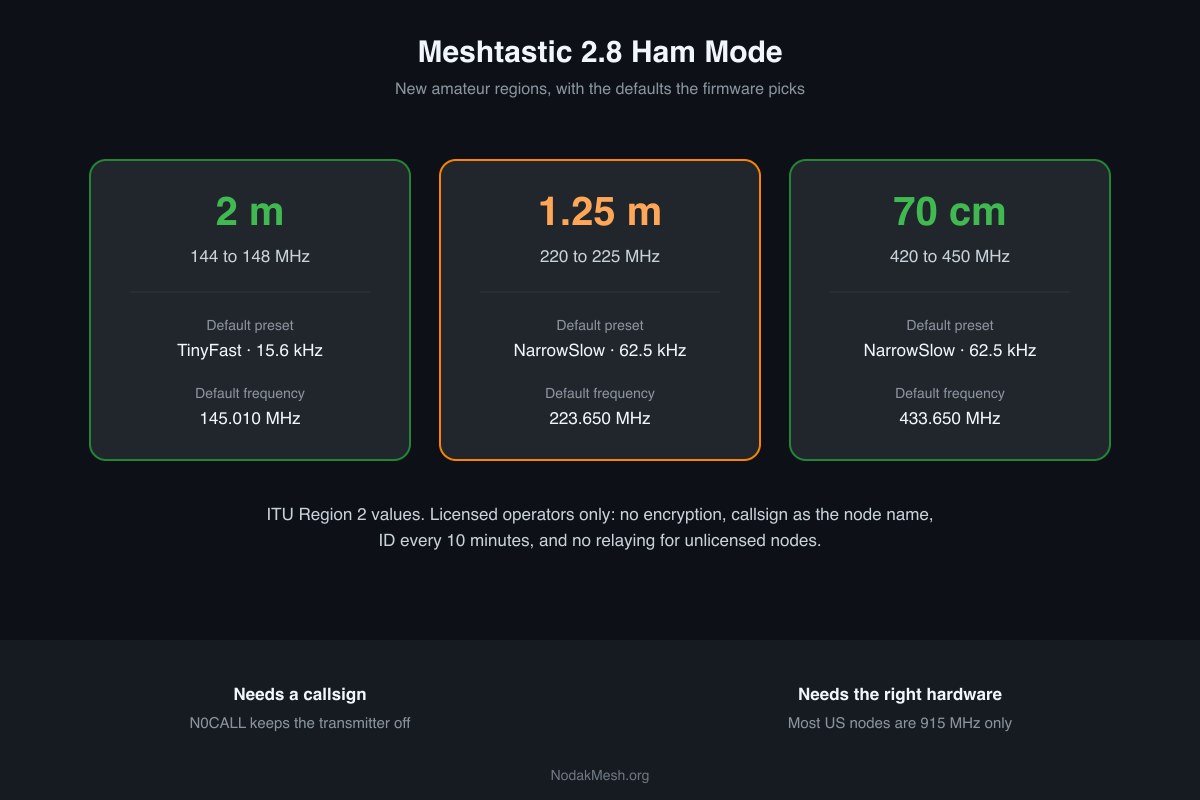
Each band gets a region per ITU area. In the US you’re in ITU Region 2, so these are the ones that matter:
| Band | Range in the firmware | Default preset | Default frequency |
|---|---|---|---|
| 2 m | 144 to 148 MHz | TinyFast (15.6 kHz) | 145.010 MHz |
| 1.25 m | 220 to 225 MHz | NarrowSlow (62.5 kHz) | 223.650 MHz |
| 70 cm | 420 to 450 MHz | NarrowSlow (62.5 kHz) | 433.650 MHz |
A few details are worth knowing:
- The presets are narrow. The 2 m regions use the new TinyFast and TinySlow presets at 15.6 kHz, padded to 20 kHz channels so they fit ham band plans. 70 cm and 1.25 m use 62.5 kHz, padded to 100 kHz. Compare that with LongFast’s 250 kHz on 915 MHz. Narrow channels are slow, but they fit alongside FM repeaters and packet users instead of over them.
- 70 cm shares one frequency worldwide. All three ITU regions default to 433.650 MHz. The pull request says that’s on purpose, “to enable long-distance cross-region comms (via Balloons, Satellites, etc).”
- 1.25 m is Americas-only. The firmware’s range is 220 to 225 MHz, but the source itself notes that the US and Canada don’t give hams 220 to 222 MHz. The default, 223.650 MHz, sits inside the 222 to 225 MHz US amateur allocation.
- A Technician license covers all three bands, since Technicians have full privileges above 50 MHz.
What Ham Mode Does
Picking an amateur region on the device screen brings up a prompt: “I confirm I am a licensed amateur radio operator.” Say yes, and the node goes into licensed mode. The firmware source shows what that changes:
- Encryption is turned off. Every channel’s key is removed, and the admin channel is disabled. FCC Part 97 doesn’t allow messages encoded to obscure their meaning, so a ham-band mesh runs in the clear.
- Your callsign becomes your node’s name. The long name becomes your callsign, or your callsign followed by your old name.
- The node identifies itself every 10 minutes. It broadcasts its node info every 600 seconds, which the source labels as being for the FCC’s station ID requirement.
- It won’t relay for unlicensed nodes. A licensed node drops packets to or from a node it knows is unlicensed, and it only rebroadcasts on its own channels.
- It gets a new key pair. Licensed mode regenerates the node’s keys, so its identity changes.
- Power limits are yours to set. Licensed nodes can go above the region’s default power limit, within your license.
There’s one safety catch. When you turn Ham Mode on from the device screen, the callsign is set to the placeholder N0CALL, and with that callsign the node keeps its transmitter off. It won’t go on the air until you enter your real callsign from the app or the CLI. You can’t accidentally transmit on 2 meters without identifying.
Going back is just as deliberate. Pick a normal region while licensed and the screen asks whether to keep licensed mode or revert, warning that reverting “will re-enable encryption.”
The Hardware Catch
This is the part most people will trip on. Almost every Meshtastic node sold in the US is 915 MHz hardware. The radio chip may tune lower, but the filters, matching network and antenna on the board are built for 915 MHz. Setting a 70 cm region on a 915 MHz board won’t get you a usable 70 cm radio.
2 meters is harder still. Semtech rates the SX1262, the radio in most current nodes, from 150 MHz up, below the 144 to 148 MHz band. The 2 m pull request says it was split off work on LilyGO’s band-pass-filter T-Beam, to unblock 144 MHz versions of the T-Beam Supreme and the TLora32. Until boards like that ship, 2 m Meshtastic is a builder’s project.
70 cm is the easiest place to start. Several boards come in 433 MHz versions. Check that the board, not just the chip, is sold for 433 MHz, and use an antenna cut for 70 cm.
Ham Mode or a Ham Radio?
Ham Mode puts Meshtastic’s text messaging, positions and mesh routing on amateur frequencies. It doesn’t make a node a voice radio, and it doesn’t replace one. For working local repeaters and simplex on 2 m and 70 cm, a dual-band handheld is still the tool. Our radio store has those, sorted by band and features.
Where Ham Mode gets interesting is a mesh that leans on the rules and the room hams have: no 915 MHz crowding, more power where your license allows it, and a shared 433.650 MHz frequency for balloon and long-distance experiments.
Getting Set Up
- Flash 2.8 on a board built for the band you want. 2.8.1 is an alpha, so read our 2.8 overview first.
- Pick the ITU2 region for your band on the device screen and confirm you’re licensed.
- Set your real callsign from the app or the Meshtastic CLI. Until you do, the node won’t transmit.
- Coordinate with the other hams on your mesh. A licensed mesh only works if everyone on it is licensed and on the same region and preset.
If you’re not licensed yet, the Technician exam covers every band in this post. And if you’re coming at it from the other direction, a ham who’s curious about LoRa mesh, our Meshtastic device roles guide is a good place to see how the network side works.
Comments
Related Posts
Meshtastic 2.8 Traffic Management and Automatic Hop Limits
Meshtastic 2.8 trims busy meshes with position dedup and automatic hop limits. What runs by default, what's opt-in, and what it means for your node.
Meshtastic 2.8: Why Your Node Disappeared From the Map
Meshtastic 2.8 turns off position and telemetry sharing on public channels, even on upgrade. Why your node left the map and how to share again.
Meshtastic Lock Icons and Public Key Mismatch Explained
What the green, yellow and red locks mean in the Meshtastic app, why a node shows Public key mismatch and how to fix it, and the new 2.8 signed badges.