MeshOS on LilyGO T-Deck: Standalone Off-Grid Messenger
MeshOS turns the LilyGO T-Deck into a phoneless MeshCore node. Full keyboard, offline maps, encrypted messaging, mesh tools. What it does and who it's for.
The LilyGO T-Deck has the hardware for a standalone mesh node. ESP32-S3, SX1262 LoRa radio, physical keyboard, 2.8-inch color screen. What it lacked was a polished interface that didn’t require a phone. MeshOS by Andy Kirby fixes that. It’s new firmware that turns the T-Deck into a fully self-contained off-grid messenger.
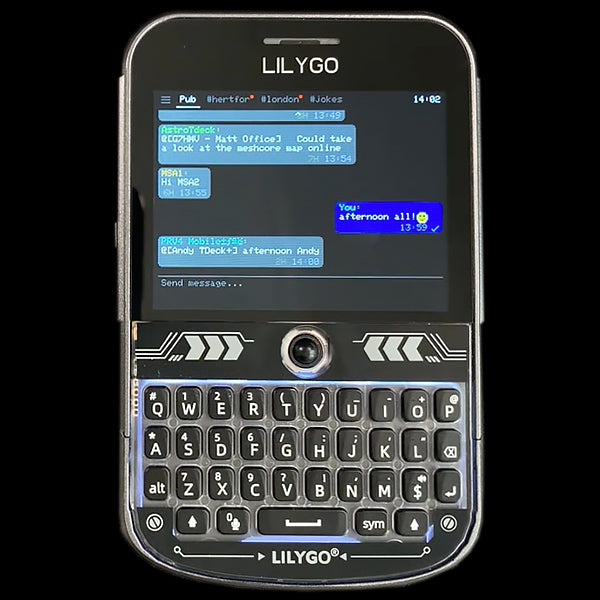
Type on the keyboard, hit send, and your message travels over LoRa through the mesh. Miles of range, no cell service, no internet, no phone required.
Everything below is from the official documentation, demos from Andy Kirby, and MeshCore reports from people running it in the field.
What MeshOS Actually Does
MeshOS is embedded firmware that runs MeshCore’s mesh protocol directly on the T-Deck. You get:
- Direct messaging with end-to-end encryption
- Channel and group messaging
- Multi-hop routing through repeaters
- GPS mapping with offline maps (T-Deck Plus only)
- Full MeshCore terminal access
The T-Deck becomes a self-contained mesh node. Power it on, and you’re on the network.
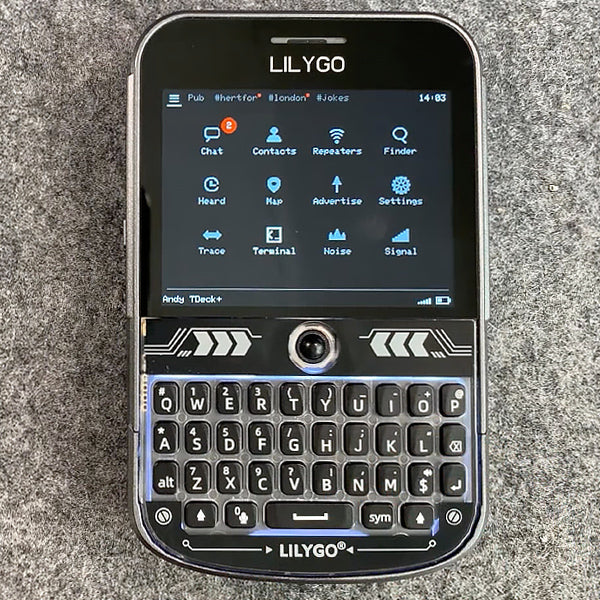
The Interface
The chat UI looks like a modern messaging app. Speech bubbles, color-coded usernames, scrollable threads. You switch between channels and DMs with tabs. There’s emoji support (about 30 so far), delivery receipts, and press-to-reply.
If someone sends a URL, MeshOS displays it as a QR code you can scan with your phone later. A clever workaround for a device with no internet connection.
Notifications work. New messages trigger a popup, an optional alert tone, and can wake the screen and keyboard backlight. There’s also an always-on lock screen that shows time, battery, and mesh signal strength.
Mesh Tools
MeshOS includes utilities you’d normally need a computer for.
Repeater Scanner. Finds repeaters in range and lets you whitelist which ones to use. Prevents your contacts list from filling up with every repeater the radio hears.
Last Heard list. Shows recent stations with signal strength, distance, and approximate location. Quick way to see who’s active nearby.
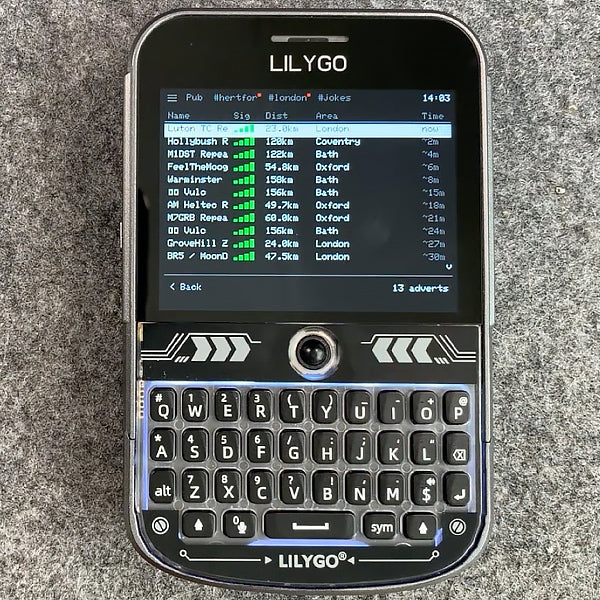
Mesh Signal Meter. Like cell signal bars, but for mesh coverage. Shows when you last heard a repeater and which one.
Trace Route. Follow a message’s path through the mesh. Every hop, every signal quality.
Noise Floor Monitor. Live graph of RF background noise. Useful for diagnosing why messages aren’t getting through.

Repeater Admin. If you run your own repeater and have the credentials, you can sync its clock, check stats, and trigger adverts directly from the T-Deck. No laptop required.
GPS and Mapping
The T-Deck Plus has built-in GPS. The standard T-Deck doesn’t. MeshOS uses the Plus’s GPS to plot your position on an offline world map. The map includes major city names and multiple zoom levels, all stored in the firmware. No external tile downloads.
You can see other nodes and repeaters on the map if they’ve shared their coordinates. Pan and zoom with the trackball or touchscreen. The UK view has a detailed outline showing active nodes in real time.
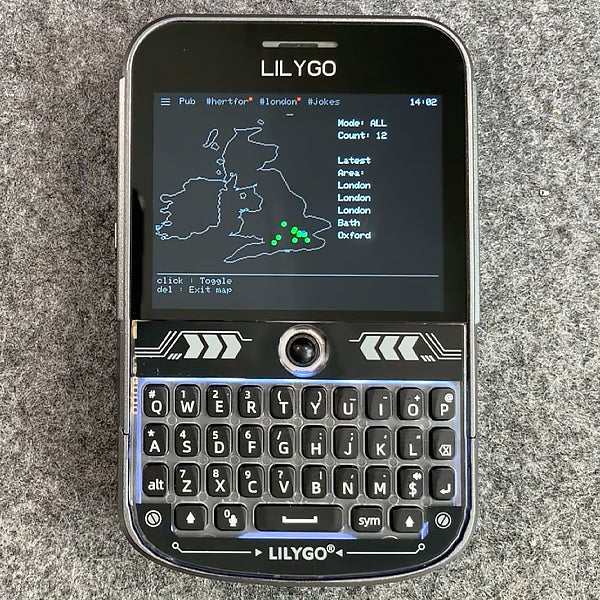
Higher zoom levels require the paid registration key. The basic map works without it.
The Terminal
For anyone who wants to dig in, MeshOS includes a full MeshCore terminal on the device. Every packet, every routing decision, every acknowledgment scrolls by in a color-coded log. You can enter commands, log into remote repeaters (if you have admin rights), and watch the mesh work in real time.
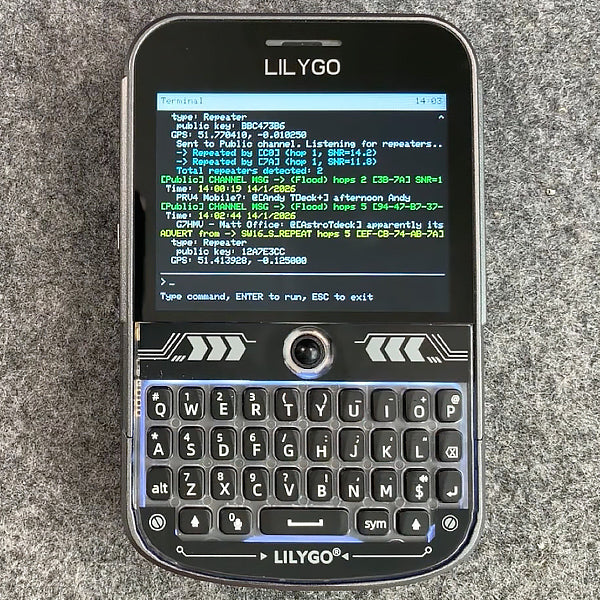
The terminal output mirrors to USB serial too, so you can use a computer keyboard if you prefer.
Full Specs
| Spec | Detail |
|---|---|
| Target Hardware | LilyGO T-Deck and T-Deck Plus |
| MCU | ESP32-S3 |
| LoRa Chip | SX1262 |
| Keyboard | Physical QWERTY (integrated on T-Deck) |
| Display | 2.8-inch color screen |
| GPS | T-Deck Plus only (external on standard T-Deck) |
| Mesh Protocol | MeshCore |
| Encryption | End-to-end on direct messages |
| Offline Maps | Bundled in firmware |
| Frequencies | 915 MHz (US), 868 MHz (EU) |
| Firmware Base | MeshCore |
| Interface | Chat, map, terminal, admin tools |
| Price | Free to try, £8 for full license |
Getting Started
Flash the firmware. Use the MeshCore Web Flasher, or download the binary and flash via esptool. A few minutes over USB. Pick the right frequency for your region (915 MHz for US, 868 MHz for EU).
Initial setup. MeshOS walks you through three steps on first boot:
- Set your nickname
- Choose your region and frequency
- Keys generate automatically
After that, send an advert so others can see you, and start messaging.
Optional registration. Basic features are free. For £8, you unlock deeper map zoom and remote repeater administration over RF. The license is tied to your device’s serial number.
Who This Is For
T-Deck owners who want to ditch the phone pairing. If you bought a T-Deck to have a pocketable mesh node and you’re tired of Bluetooth-pairing a phone to use it, MeshOS is the clean answer.
Repeater operators. The repeater admin tools, trace route, and noise floor monitor make this a real troubleshooting kit. Walking your mesh with a T-Deck running MeshOS is a much better experience than walking it with a laptop.
Emergency and go-bag use. The T-Deck runs all day on battery, fits in a cargo pocket, and doesn’t depend on a smartphone. For situations where you can’t trust cellular infrastructure to be up, this is closer to a self-contained radio than most mesh setups.
Not the right pick if you only own the standard T-Deck and care about maps. GPS and on-device position display need the T-Deck Plus. You can still use MeshOS on the standard T-Deck, but the map side is limited.
The T-Deck has been a capable piece of hardware since it launched. MeshOS is what makes it a complete standalone mesh device. If you’ve got one sitting in a drawer because the default firmware didn’t click, this is the reason to pull it out.
Links:
MeshOS is developed by Andy Kirby. MeshCore is an open-source mesh protocol. See our MeshCore getting started guide for more.
Comments
Related Posts

MeshCore Path Hash Modes Explained: 1, 2, and 3 Byte
How MeshCore's 1, 2, and 3 byte path hashes work, why 1-byte collides at scale, and when to switch. Guide to path.hash.mode for growing meshes.

How MeshCore Works: Companions, Repeaters and Room Servers
A plain-English guide to MeshCore: what companions, repeaters and room servers do, how messages find a path, which frequency to use, and common fixes.
EasySkyMesh: Power-Efficient MeshCore Firmware
EasySkyMesh publishes MeshCore firmware tuned for low idle current: 8-10 mA on Heltec V3 and RAK4631 repeaters. Why that matters for solar nodes.